Platform Notifications
A notifications experience that alerts users on live activity across multiple security modules, designed for both organization-based and multi-tenancy points of view.
User Problem
Current customer notifications are fragmented across modules, creating a frustrating experience for customers. They are not managed consistently or offer the same level of functionality. They lack detail, not providing users with enough information to make a decision (even if that decision is to ignore it).
Goal
To enable users to create notifications that are useful and timely across all modules.
My Role
I designed the in-app notifications experience for both single-tenant and multi-tenant environments, the email templates and the 3rd-party integrations experience.
I identified use cases across the cybersecurity environment and moulded them into a single notification banner design and settings experience.
I worked cross-functionally with front-end and back-end developers as well as product managers and end-users to develop an experience that was both robust and user-centric.
Two Points of View
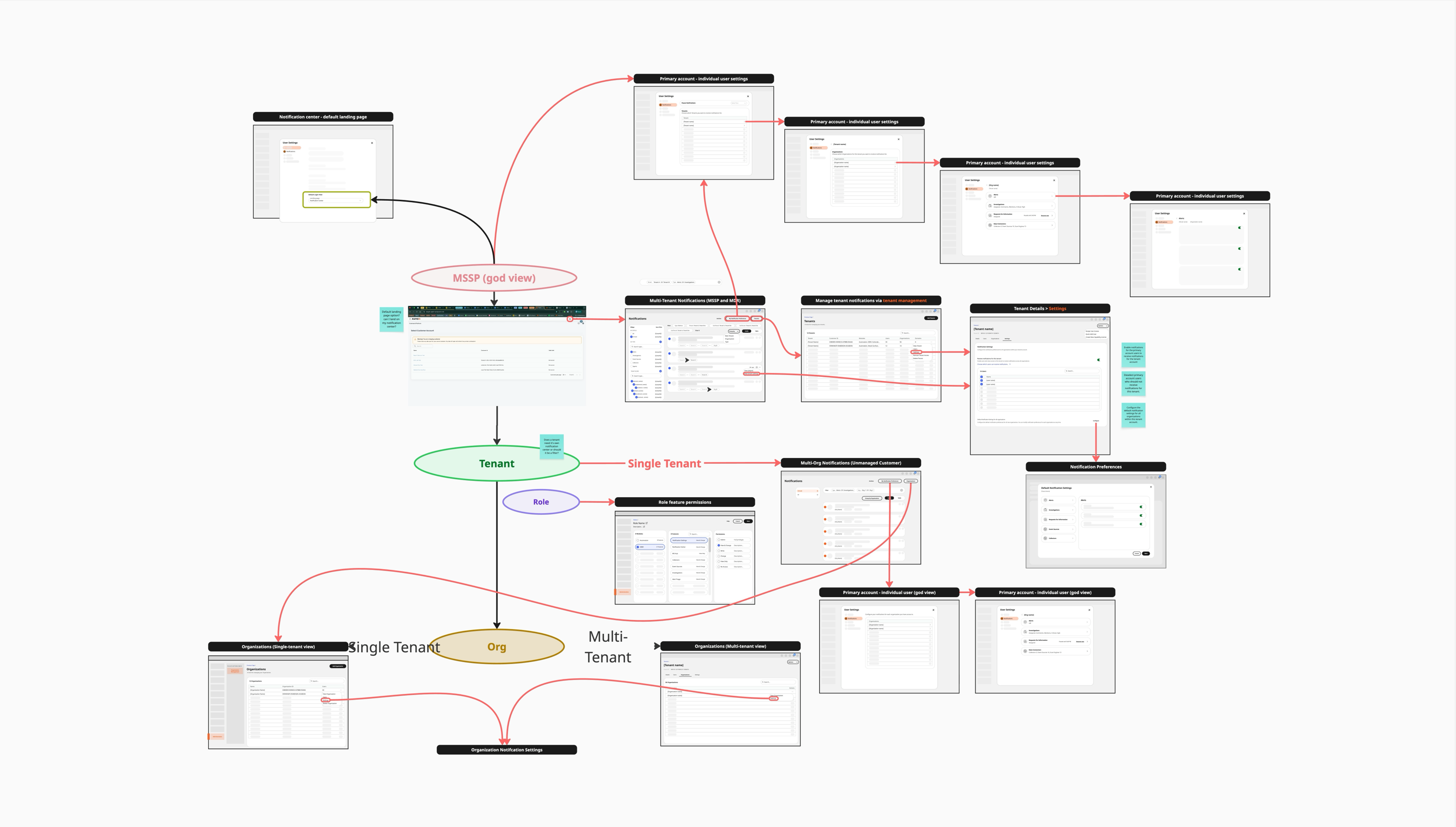
Multi-tenancy is a huge part of Rapid7's service — they have customers who manage customers, with many organizations sitting below them. Alongside this, most customers just need a straightforward, single organization-based view.
It was important that the notifications experience considered both of these perspectives from the outset, rather than designing for one and retrofitting the other. From wireframing through to final design, I worked through each stage for both points of view in parallel.
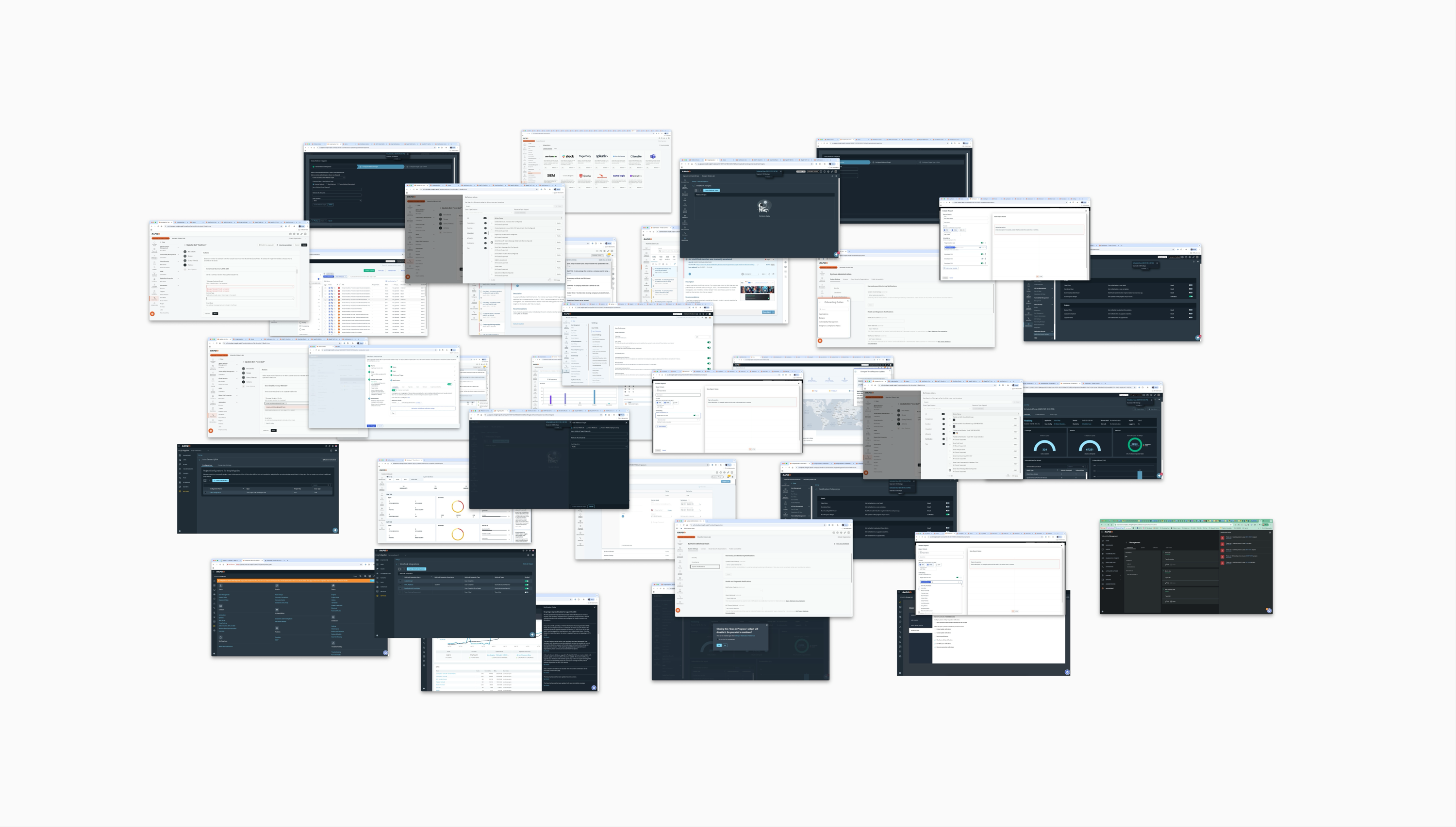
What do the current experiences look like?
In order to design the new notifications experience, it was first important to identify what already existed in our system.
What are competitors doing?
To understand what made a good notifications experience, I carried out competitor analysis on 19 competitors. This was extremely important to understand best practices for interaction design, content design and behavior design.
Direct competitors
- Cisco Security
- CrowdStrike
- Tanium
- Arctic Wolf
- Tines
Indirect competitors
- Dovetail
- Jira
- Zoom
- Lattice
- Freshservice
- Miro
- Azure
- Workday
- GitHub
- Figma
- Squarespace
- Windows 11
- Apple
- Slack
I drew on different aspects of these tools to inform three areas of the experience: Notification Settings, the in-app Notification Center, and emails.
Use Cases
Use cases are broken out into three streams of importance.
Upcoming
- Receive notification on service maintenance, performance degradation, or upcoming downtime.
- Notify me when a module licence is nearing expiration, when usage exceeds a threshold or when log ingestion approaches quota.
Immediate Response
- I want to know when activity needs attention (Alerts, Investigations, findings) based on my personal thresholds or rules.
- Notify me when a incident, vulnerability remediation task, or compliance issue is assigned to a user, or when a teammate adds a comment/tag in platform.
- Send a notification when a critical integration fails.
- Notify admins when a user is added, an account is deactivated, or a role/permission change across the platform.
Happened
- Notify when organizational risk posture shifts significantly or when a customer's metrics deviate from industry peers.
- Notify when a feature is available or when a customer hasn't yet configured a recommended module.
- Notify me when a new automation integration, detection rule, or compliance policies are available.
Dynamic Email Templates
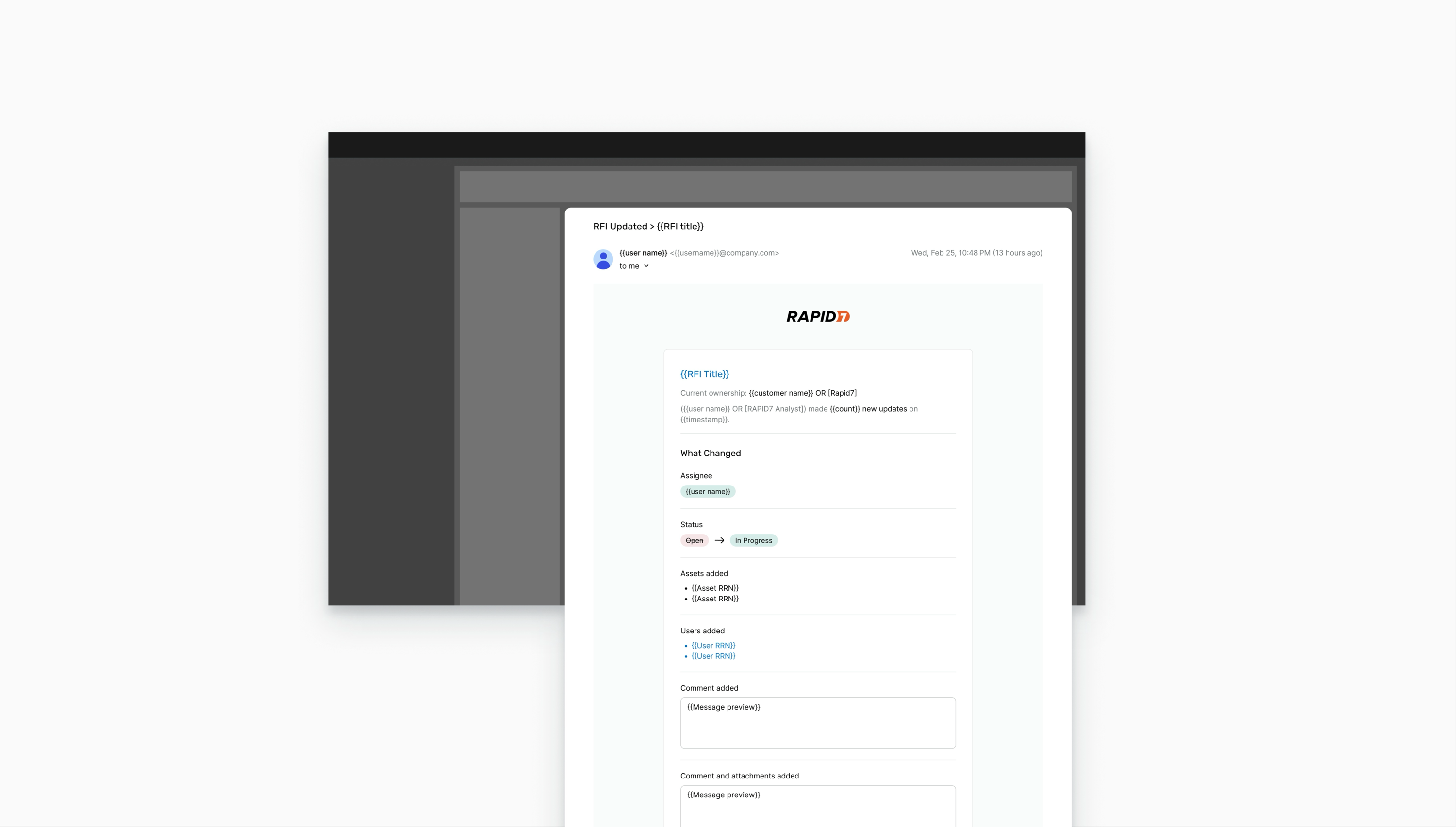
As part of the notifications experience I worked on creating a robust email template that would allow us to standardize how our users are notified about events within the Platform.
One of our first use cases for this templates was RFIs (requests for information) where internal MDR users would receive and respond to customer requests.
I worked closely with back-end engineering across different teams to build and implement this template.
Wireframing & Lo-Fi Mocks
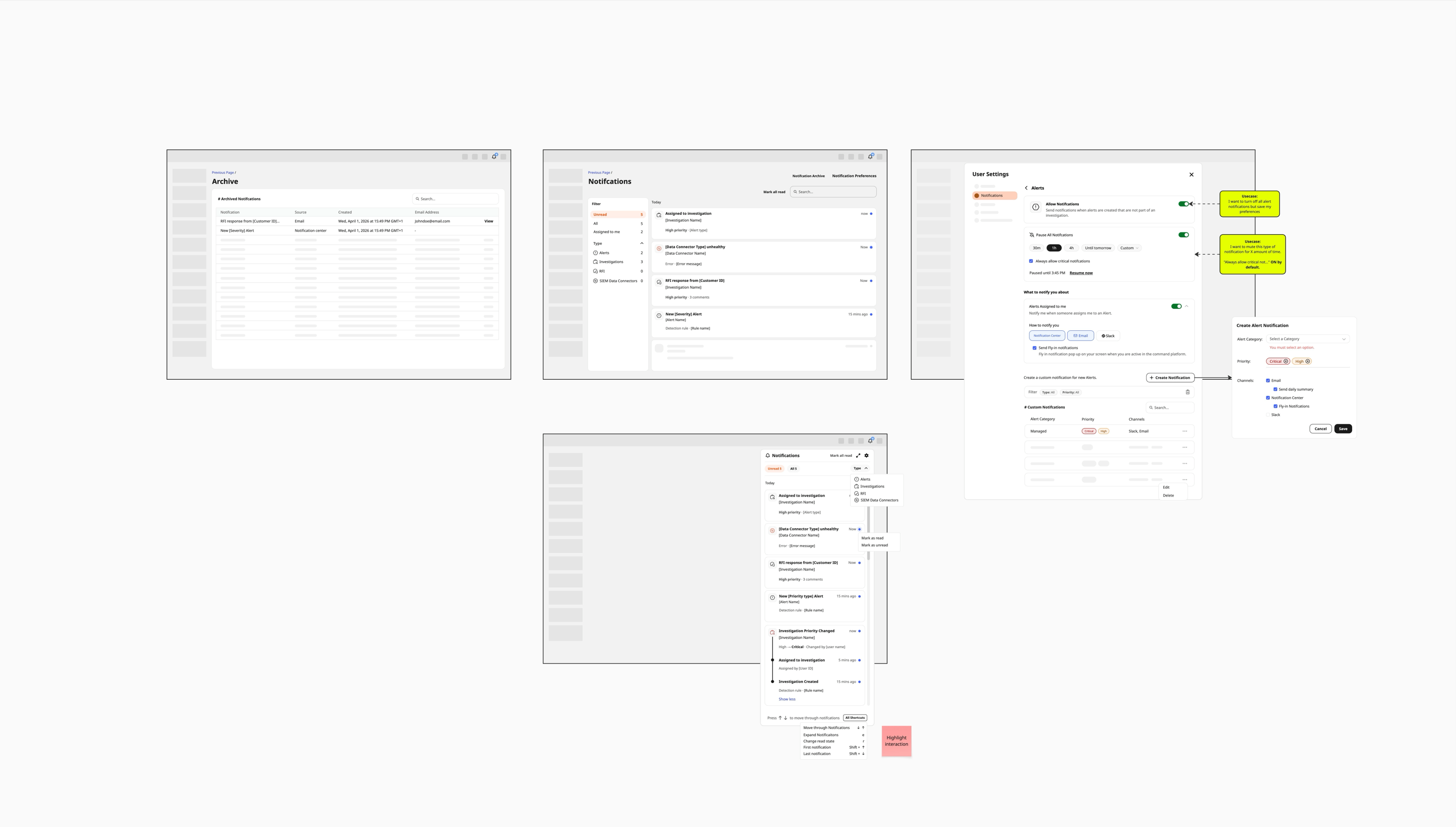
Alongside the email templates, the other major piece of this project was the in-product UI experience — the in-app Notification Center and Notification Settings. Building on the user flows and object model, I created wireframes for both the organization-based and multi-tenancy notifications experiences to begin visualising how each solution would take shape.
These early layouts helped me explore the structure of the interface and identify the components needed to bring each concept closer to reality.
I then converted the wireframes into low-fidelity mockups to establish the initial look and feel of the experience and fine-tune the information architecture before moving into higher-fidelity design.
Organization-based
Multi-Tenancy
Prototyping
To understand the behavior and interaction design of the notification experience, I worked through prototypes for both points of view, reviewing them closely with users and refining each until it met their needs and requirements.
Halfway through the initial design phase, I switched to Kiro, an AI code editing tool, converting my Figma and Miro designs into fully functional prototypes. This accelerated prototyping 5x and let me share working prototypes with stakeholders, as well as work through ideas and test concepts out early.
Organization-based
This prototype focuses on the day-to-day experience for a single organization — reviewing notifications, adjusting alert thresholds, and managing settings without the added complexity of multiple tenants.
Figma VersionMulti-Tenancy
Designing the notification settings experience for multi-tenancy was a whole new challenge. Customers wanted high-level controls but also granular control over what their users could see and manage. I designed a tree-like navigation which enabled me to provide the visibility and control that they needed.
Figma VersionComponent Design
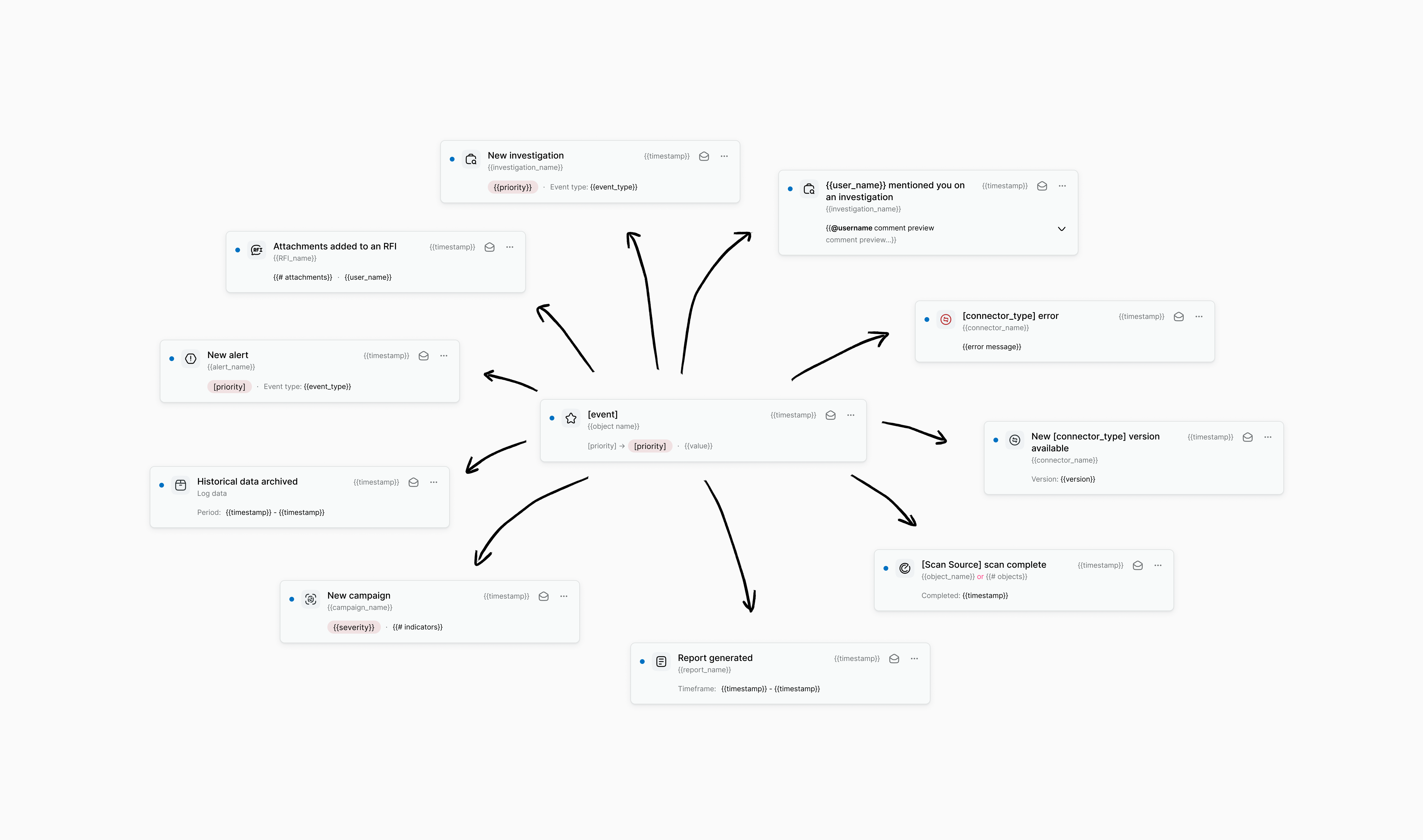
A massive aspect of this project was designing a scalable Notification card that catered for every use case across the platform, from simple status updates to complex, multi-line alerts requiring action.
I worked closely with front-end engineering to define rules for the SDK, so that any team integrating with the notification system would abide by the same rules and restrictions we set — keeping the experience consistent no matter who built on top of it.
This component and its supporting rules were designed to work for both single organization and multi-tenancy contexts.
Final Design
The final, polished experience is still being finalized as the notification service continues to roll out across the platform.
Organization-based
Final designs coming soon.
Multi-Tenancy
Final designs coming soon.
Outcome
12 platform features have adopted the notification service, using both the dynamic email template and the in-app notification UI experience.
These emails are addressing notification issues that customers have faced for a long time, replacing fragmented, inconsistent messaging with a single, standardized experience.
The service is still in active development, so quantitative impact is early to measure — but adoption across 12 features to date is a strong signal that it's solving a real, long-standing problem for customers.
Unified Data Collection
Streamlining data ingestion and asset scanning by creating a consistent data collection, management, and monitoring experience.